














You build a campaign. The messaging is sharp. The targeting looks right. The timing feels perfect. You hit send. The results come back flat. Low open rates. Hard bounces. Sales chasing contacts who left their companies months ago. A pipeline that looks healthy in the CRM and goes nowhere in real life.
The first instinct is to pull apart the campaign. Rework the subject line. Question the offer. Brief a new creative direction. But most of the time, that is the wrong diagnosis. When B2B campaigns fail quietly — not spectacularly, just slowly and consistently — the problem is rarely the strategy.
It is the data the strategy is running on.
Most B2B CRMs look organized. Contacts in columns, accounts tagged, deal stages mapped out. What you cannot see from the dashboard view is how much of that data is actually usable. Outdated job titles from two years ago. The same company entered six different ways. Phone numbers that ring out to nobody. Contacts who moved roles before your last campaign even launched.
According to Gartner, poor data quality costs organizations an average of $12.9 million per year. In B2B, that number is not abstract. It is deals that never got worked, outreach that never landed, and decisions made on numbers that were never accurate.
A B2B CRM data audit is how you find what is broken before it costs you another campaign. This guide walks you through how to do it, step by step.
What is a CRM Data Audit?
Let’s start with something simple – an audit is not the same as cleanup.
A cleanup fixes visible issues. An audit diagnoses systemic problems in how your data is created, maintained, and used.
A CRM data audit is a structured review of every record in your customer relationship management system. The goal is to identify what is inaccurate, incomplete, duplicated, or outdated. And then fix it before it does damage.
In the B2B context, this means going through your contact database, company records, deal stages, and associated data fields to answer one core question: is this data actually usable?
A CRM data audit is not a one-time cleanup. It is part of a broader data quality management discipline that keeps your database reliable over time. Contacts change jobs. Companies get acquired. Phone numbers go dead. Job functions shift. Without a regular audit process, your CRM gradually fills with information that looks current but is not.
- The B2B CRM data audit process typically covers four areas:
Accuracy (is the data correct?) - Completeness (is the data whole?)
- Consistency (does it follow the same format across records?)
- Timeliness (is it still relevant?)
Always remember, without an audit, CRM data doesn’t just degrade. It misleads decision-making.
Key Takeaway
A CRM data audit reviews your database for inaccurate, duplicate, missing, or stale records. Without regular audits, your CRM becomes a liability instead of an asset.
Bonus: Want to know if your data is ready? Check here.
Why Does B2B CRM Data Decay So Fast?
B2B data has a short shelf life. People change jobs, get promoted, leave companies, retire, or get laid off at a pace that most marketing teams do not account for. According to HubSpot, approximately 30% of B2B contact data becomes outdated every year.
That means if you built your contact list 18 months ago and never touched it, roughly half of your records are now unreliable in some way.
There are three main reasons CRM data degrades so quickly in B2B environments.
First, manual data entry. When sales reps enter contacts by hand, errors creep in. Misspelled names. Wrong domains. Incomplete company details. This is not negligence. It is just the reality of asking busy people to fill out fields between calls.
Second, no ownership. In many companies, nobody is formally responsible for CRM data hygiene. Marketing thinks sales owns it. Sales thinks marketing owns it. IT is focused on infrastructure. The result is that nobody is maintaining it.
Third, no sync with external sources. CRM records are typically static. They do not automatically update when a contact changes jobs or when a company rebrands. Without a CRM data enrichment process or a connection to a live data provider, records go stale silently.
Key Takeaway
B2B contact data decays at roughly 30% per year. Manual entry errors, unclear data ownership, and lack of enrichment are the primary drivers of CRM data decay.
How to Audit CRM Data: A Step-by-Step B2B Database Audit?
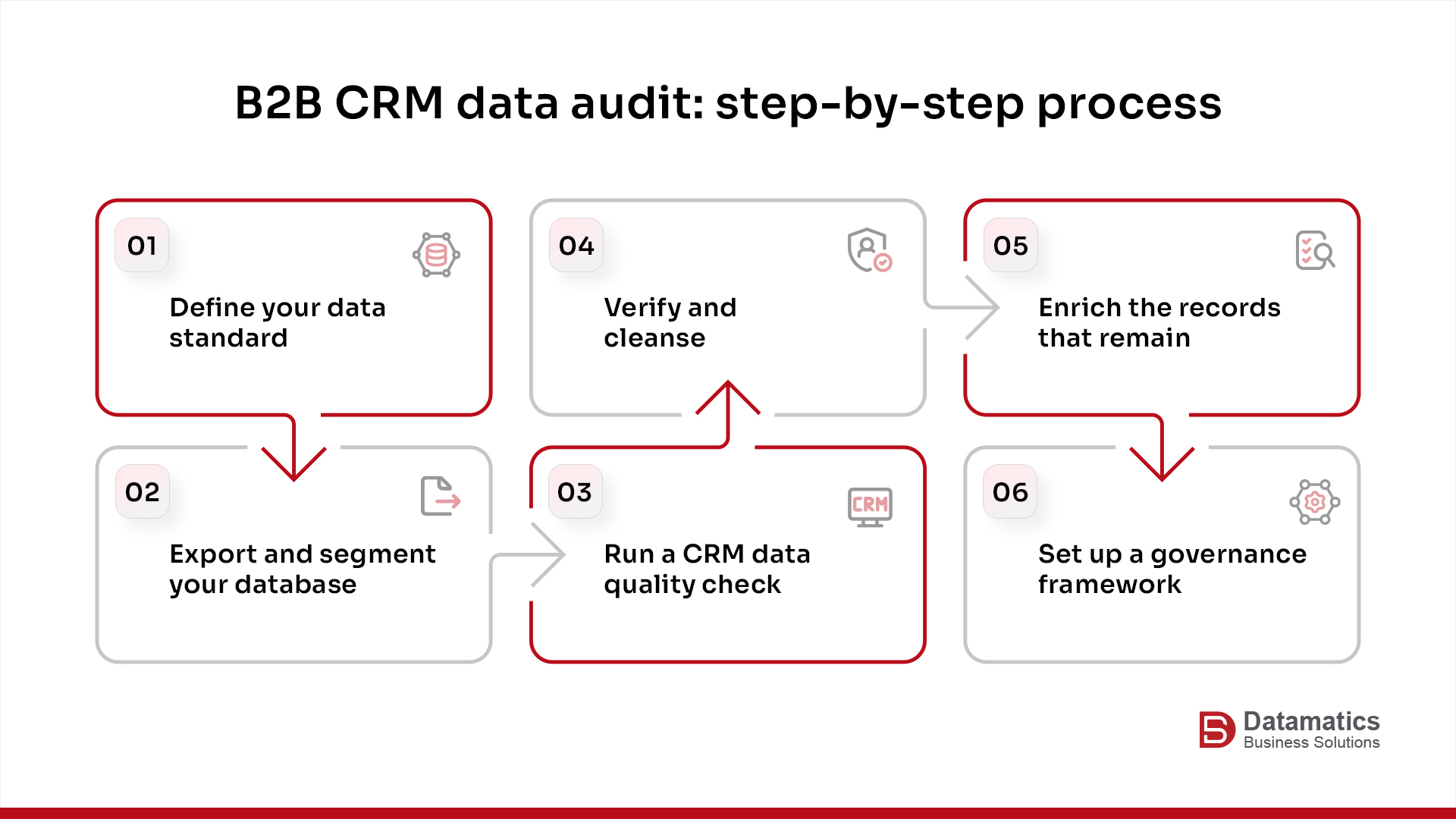
I have put together a step-by-step B2B CRM data audit process. I know it works because we have been doing it for years. And it works across platforms. Whether you are using Salesforce, HubSpot, Zoho, or any other major CRM.
Step 1: Define What Good Data Looks Like for Your Business
Before you audit anything, you need a benchmark. Ask yourself – What does a complete, usable contact record look like in your CRM?
For most B2B teams, a minimum viable contact record includes the following:
- Verified business email
- Job title
- Company name with the correct industry tag
- LinkedIn profile URL
- Phone number
- Geographic region.
You may also want firmographic data like company size, annual revenue, and technology stack depending on your sales process.
Document your ideal data fields before the audit starts. This becomes the standard against which every record is measured.
Step 2: Export and Segment Your Database
Pull a full export of your CRM database. Most CRM platforms allow you to export records as a CSV or Excel file.
Once you have the export, segment it. Group records by:
- Source (inbound form, list upload, manual entry, trade show)
- Age (when was each record created or last updated?)
- Engagement status (have they ever opened an email
- Attended a webinar, or responded to outreach
- Completeness (how many required fields are empty?)
This segmentation will help you prioritize where to spend your audit time.
Step 3: Run a CRM Data Quality Check
This is the core of the CRM data quality check process. You are looking for four categories of problems.
- Duplicate records: Run a deduplication scan. Check for contacts with the same email address, or the same name at the same company. Duplicates inflate your database size and cause inconsistent communication — some contacts will receive multiple emails from the same campaign, which is both annoying and embarrassing.
- Invalid or bounced emails: Cross-reference your email list against your campaign bounce data. Hard bounces mean the email address no longer exists. Remove or flag these immediately.
- Missing critical fields: Run a completeness report across your required fields. How many records are missing a job title? How many have no company name? These gaps tell you exactly where your data quality issues are concentrated.
- Outdated job information: This is the hardest one to catch manually. Look for indicators like email addresses still tied to companies that have been acquired or rebranded, or job titles that no longer reflect current industry norms.
Step 4: Verify and Cleanse
Once you have identified the problems, you need to fix them.
For smaller databases, this can be done manually. For large B2B databases (take anything over 10,000 records), you will need a more structured CRM data cleanup process, typically involving either a data cleansing tool or a B2B data services provider.
Cleansing means removing records that cannot be recovered, correcting formatting inconsistencies, and updating records where you can confirm new information through LinkedIn, company websites, or third-party data sources.
Step 5: Enrich the Records That Remain
Data cleansing removes the bad. CRM data enrichment adds what is missing.
Enrichment is the process of appending additional firmographic, technographic, or intent data to your existing records. This might mean adding company revenue data, identifying the technologies a prospect uses in their stack, or appending direct-dial phone numbers to records that only have general company lines.
According to Dun & Bradstreet, companies that use enriched, accurate data in their outreach see a meaningful improvement in response rates compared to campaigns run on unverified lists. Enriched data is not a nice-to-have in competitive B2B markets. It is what separates a campaign that books meetings from one that generates bounces.
Step 6: Set Up a Governance Framework
The audit is not the finish line. It is the starting point for ongoing data quality management.
After the initial audit, put governance in place. Assign data ownership — someone on your team should be responsible for CRM hygiene. Set mandatory fields in your CRM so incomplete records cannot be created. Build a regular audit cadence (quarterly is a reasonable starting point).
And establish a protocol for reviewing new data before it enters the system — whether that is an automated validation check on form submissions or a manual review process for list uploads.
Key Takeaway
The B2B CRM data audit process has six steps: define your data standard, segment the database, run a quality check, cleanse bad records, enrich what remains, and build governance to prevent decay from repeating.
What is CRM Data Enrichment and Why Does It Matter for B2B Campaigns?
Most CRM records start life incomplete. A contact comes in through a form fill, a trade show scan, or a manual entry by a sales rep between calls. You get a name, an email, maybe a company name. That is not enough to run a targeted campaign on.
CRM data enrichment is how you fill the gaps. It is the process of appending verified data from external sources to your existing contact and account records — so the people using your CRM actually have something to work with.
In B2B, enrichment typically covers five areas.
Firmographic data fills in company-level details: industry classification, employee headcount, annual revenue, and headquarters location.
Technographic data tells you what software a company is running — relevant if you sell something that integrates with, competes against, or replaces tools already in their stack.
Contact-level data adds what is missing at the individual level: direct phone numbers, verified job titles, and seniority information.
Intent data identifies accounts that are actively researching topics related to your category right now — not six months ago, but currently in-market.
And account hierarchy data maps out parent-subsidiary relationships, which matters when you are selling into enterprise accounts where the buying decision rarely sits in one place.
The timing of enrichment matters as much as the enrichment itself. Before a large outbound push. Before an ABM program launch. After a merger or acquisition drops a new batch of records into your system with no context attached.
These are the moments where unenriched data does the most damage — incomplete segmentation, shallow personalization, targeting that looks right in a spreadsheet and falls apart in execution.
Key Takeaway
Enrichment is not about having more data. It is about making the data you already have actually usable before it costs you a campaign.
What Are the Signs Your CRM Data Needs an Audit Right Now?
Some teams wait for a failed campaign before they investigate their data. You do not need to wait that long.
There are specific warning signs that suggest your CRM needs a B2B database audit immediately.
- Your email bounce rate is above 2% on a regular send. Industry benchmarks from Mailchimp suggest that a healthy B2B bounce rate sits below 2%. Anything above that signals data problems.
- Sales is regularly complaining that contacts are unreachable, or that they are calling people who no longer work at the company.
- Your CRM has records with the same company name entered in five different ways — “IBM”, “I.B.M.”, “IBM Corp”, “IBM Corporation”, “IBM Inc.” This formatting inconsistency means your account-level reporting is unreliable.
- You have a large percentage of records with no activity in 18+ months and no enrichment history.
- Your campaign segmentation keeps pulling up the same irrelevant contacts because there is no reliable data to filter on.
If any of these sound familiar, the B2B CRM data audit process should move up your priority list before your next campaign goes out.
Key Takeaway
High bounce rates, sales complaints about bad contacts, formatting inconsistencies, and poor segmentation results are all signals that an immediate audit is overdue
You can also read: Data Cleansing vs Data Enrichment: Everything You Need to Know
How B2B Data Service Providers Can Help with a CRM Audit
At a certain database size, doing this manually stops making sense. If your CRM has 40,000 records and two people on the marketing team, a DIY audit is not a realistic plan. It is a project that will get started, stall, and never finish.
This is where B2B data service providers earn their place.
The practical value comes down to three things.
a. The first is data access. A good provider maintains proprietary databases of verified contacts and companies, updated on a rolling basis. That means they can cross-reference your records against live data and surface what is outdated in hours, not weeks. You are not relying on a team member manually checking LinkedIn profiles one by one.
b. The second is tooling. Deduplication, validation, enrichment at volume — these are not tasks that scale with headcount. A provider that does this for a living has automated workflows built for exactly this kind of work. What would take your team three months takes them a fraction of that.
c. The third is compliance. GDPR, CAN-SPAM, CCPA — the regulations around B2B data use are not simple, and they are not static. A data partner that works within these frameworks daily understands what your cleaned and enriched database can and cannot be used for. That matters when you are running outbound campaigns across multiple geographies.
According to Anteriad’s 2025 B2B Marketing Edge report, B2B marketers who are confident in their data strategy are 3x more likely to see significant revenue growth than those who are not. The gap between teams working with clean, verified data and those working without it shows up directly in pipeline and revenue results.
Key Takeaway
If your database is large, your team is stretched, or your last audit attempt never made it past step two — a B2B data services partner is not an extra cost. It is the reason the audit actually gets done.
Case Study: How a B2B SaaS Company Recovered Campaign Performance After a CRM Audit
A mid-size B2B SaaS company in the HR technology space came to us with a problem they could not ignore any longer.
The problem – Their outbound campaigns were underperforming across the board.
- Email open rates had dropped to below 12%.
- Sales was spending hours each week chasing contacts who had either left their companies or never existed in their CRM in a usable form.
- Marketing suspected the data was bad. They did not know how bad.
Our team ran a full B2B CRM data audit across their database of approximately 38,000 contacts.
What we found wasn’t anything unusual, but it was significant.
- Nearly 6,200 records were duplicates. The same contact entered multiple times under slightly different names or email formats.
- Around 4,800 emails returned hard bounces during verification.
- Another 7,000+ contacts had incomplete records with missing job titles, incorrect industry tags, or company names that no longer matched current entities.
In total, roughly 47% of the database had at least one data quality issue.
We ran a structured audit process. We started by removing duplicates, flagging and discarding unrecoverable records, and standardizing field formats across the remaining contacts. This was followed by a targeted enrichment pass: verified job titles, direct-dial numbers, updated company firmographics, and seniority-level tagging for the accounts that mattered most to their pipeline.
- The results showed up quickly in the next campaign cycle.
- Email deliverability improved from 61% to 89%
- Open rates moved from under 12% to just over 21%
- Sales reported a measurable reduction in dead-end follow-ups
- The team also had a cleaner segmentation foundation going into their next ABM push
No single campaign fix drove those numbers. A cleaner database did.
How Datamatics Business Solutions Supports B2B CRM Data Audits
We work with B2B companies at various stages of the data lifecycle. This includes everything from initial database assessment through ongoing data quality management.
The process starts with a diagnostic review. We examine your existing CRM database to identify the specific issues affecting your data quality. These can be high duplicate rates, low field completion, outdated contact information, or inconsistent formatting across record types. Before any cleanup begins, you have a clear picture of exactly what is broken and where.
From there, we run structured cleansing processes tailored to your CRM platform. This covers deduplication, invalid email removal, field standardization, and removal of records that cannot be recovered. We design the process to run without disrupting your active sales and marketing workflows.
On the enrichment side, we append verified firmographic and contact-level data using our proprietary data assets — filling in missing job titles, adding direct-dial numbers, confirming company details, and flagging accounts showing active intent signals in your target categories.
For teams preparing for a major outbound push, an ABM program launch, or a CRM migration, this is the work that determines whether those initiatives start on solid ground or repeat the same data problems.
If your last campaign underperformed and you have not audited your CRM data, speak to our team before the next one goes out.
Conclusion: Your Next Campaign Is Only as Good as the Data Behind It
Bad CRM data does not announce itself. It just quietly drains your results. One bounced email, one dead-end sales call, one misfired campaign at a time. By the time you notice the numbers are off, you have already spent the budget.
The B2B CRM data audit process is not a complicated undertaking. It is a structured set of steps that most teams can start this quarter. Define your standard, pull the export, run the quality check, cleanse what is broken, enrich what remains, and put governance in place so the problem does not rebuild itself.
What it requires is making the decision to start before the next campaign goes out. Not after.
If your last campaign underperformed and you have not looked at your CRM data as a likely cause, that is where to start.
Want to stay updated with the latest insights from the B2B data industry? Subscribe to our monthly newsletter.
Frequently Asked Questions
1. How often should a B2B company run a CRM data audit?
For most B2B teams, a quarterly audit cycle is a reasonable baseline. If you are running high-volume outbound campaigns or your sales team is very active, consider auditing monthly. At a minimum, run a full B2B CRM data audit process before any major campaign, ABM launch, or CRM migration.
2. What is the difference between data cleansing and data enrichment?
Data cleansing removes or corrects what is wrong — duplicates, invalid emails, formatting errors, outdated records. CRM data enrichment adds what is missing — firmographic data, direct phone numbers, verified job titles, intent signals. They serve different purposes and ideally happen in sequence: cleanse first, then enrich.
3. How long does a B2B database audit take?
It depends on the size and condition of your database. A database of 10,000 records with a dedicated process can typically be audited and cleansed within two to three weeks. Larger databases in the 50,000 to 100,000+ record range, especially those that have not been maintained, can take four to eight weeks when handled systematically. Working with a B2B data services provider can significantly reduce that timeline.
4. Can I run a CRM data quality check without dedicated tools?
For small databases under 5,000 records, a manual review using spreadsheet exports is feasible. For anything larger, dedicated tools or a data services partner are worth the investment. Manual processes do not scale, and they miss patterns that automated validation can catch — like domain-level email formatting errors or systemic duplicate logic.
5. What data fields should I prioritize in a B2B CRM data audit?
Prioritize the fields your campaigns and sales team actually use. At a minimum, this means business email address, job title, company name, industry, company size, and geographic region. If you run account-based campaigns, also prioritize company revenue, technology stack, and decision-maker seniority fields. These are the fields that determine whether your targeting is accurate and your personalization is relevant.
6. What is data quality management in B2B marketing?
Data quality management is the ongoing practice of maintaining the accuracy, completeness, consistency, and timeliness of data in your CRM and marketing systems. It includes the initial audit and cleanup, but also the governance processes, ownership structures, and validation rules that prevent new data problems from building up over time. Think of it as the difference between a one-time deep clean and a regular maintenance routine.

James Libera